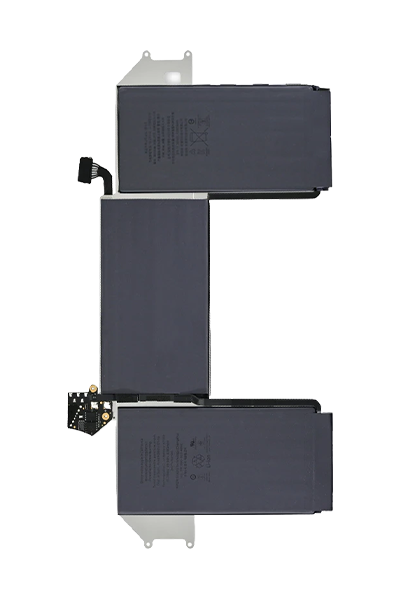
MacBook Air 13 inch M1 battery replacement in Bangladesh
MacBook Air 13 inch M1 battery replacement is the process of taking out the old, worn-down battery from a MacBook Air A2337 (Late 2020) and fitting a new MacBook Air 13 Inch M1 Battery in its place. Signs that the battery needs replacing include macOS showing "Service Recommended," the laptop dying faster than normal, and the battery swelling up inside the body. In Bangladesh, the total repair cost ranges from 8,000 BDT to 14,000 BDT depending on the battery quality and the repair center. iFixit BD one of the top repair centers in Dhaka— finish the battery swap in 30 minutes to 2 hours and give a warranty of 3 months to 12 months.
What is MacBook Air 13 inch M1 battery replacement?
MacBook Air 13 inch M1 battery replacement is the repair process of removing the old built-in battery from a MacBook Air A2337 (Late 2020) and installing a new A2389 battery in its place. The MacBook Air M1 uses a built-in A2389 battery — this battery is glued firmly inside the laptop body and cannot be taken out by the user. A trained technician uses special tools to safely remove the old battery and fit a new one.
The battery inside the MacBook Air M1 loses power capacity over time with every charge. Apple sets the replacement point at 1,000 charge cycles or when the battery holds less than 80% of its original charge capacity. macOS tracks this automatically and tells the user when the battery needs attention. Getting the battery replaced at this point brings the MacBook Air M1 back to full battery life and keeps the Apple Silicon M1 chip running at full speed.
Signs your MacBook Air M1 battery needs replacement
The signs that your MacBook Air M1 battery needs replacement fall into 3 groups: macOS battery warnings, performance problems, and physical damage to the battery — each is easy to spot if you know what to look for. The common signs that your MacBook Air 13 inch M1 battery needs replacement are given below.
MacOS "Service Recommended" Warning: The MacBook Air M1 shows a "Service Recommended" or "Replace Now" message when you click the battery icon in the top menu bar. This message means the A2389 battery has dropped below 80% of its original capacity or has exceeded 1,000 charge cycles, and macOS is telling you it is time for a battery replacement.
Battery Drains Very Fast: The MacBook Air M1 battery goes from 100% to empty in 2 to 3 hours during normal use — far shorter than Apple's rated 18-hour battery life for the MacBook Air M1. Rapid battery drain is a clear sign the A2389 battery has lost a large part of its charge capacity and needs replacing.
Laptop Shuts Down Without Warning: The MacBook Air M1 turns off suddenly when the battery shows 15% to 40% charge remaining — not at 0%. This happens because the worn-down A2389 battery can no longer deliver steady power to the M1 chip, causing the laptop to cut out unexpectedly.
Battery Swelling Inside the Body: The A2389 battery puffs up and pushes outward against the inside of the MacBook Air M1 body. A swollen battery shows up as a raised trackpad (the trackpad feels stiff or stops clicking) or lifted keys on the keyboard. A swollen battery is a safety issue and needs immediate replacement.
Slow Performance on Battery Power: The MacBook Air M1 feels slow when running on battery — apps open slowly and the laptop lags during everyday tasks. This happens because macOS slows down the Apple Silicon M1 chip to match the low power the degraded A2389 battery can deliver.
How to check MacBook Air M1 battery health before replacement
MacBook Air M1 battery health check uses 2 built-in macOS tools — the battery menu bar icon and the System Information power report — to show the current health, charge cycle count, and condition of the A2389 battery without needing any outside app or tool.
The steps to check MacBook Air M1 battery health on macOS are given below.
Open the battery menu bar icon: Hold the Option key on your keyboard and click the battery icon at the top right of the macOS screen. The MacBook Air M1 shows one of 4 battery condition labels: Normal (healthy), Replace Soon, Replace Now, or Service Battery — each label tells you how much life the A2389 battery has left.
Open System Information for detailed battery data: Click the Apple logo at the top left of the screen, select "About This Mac," click "System Report," and then click "Power" in the list on the left side. This page shows the A2389 battery's exact cycle count, current charge capacity (in mAh), and the condition status as read directly by the MacBook Air M1 battery controller.
Check the cycle count number: Find the "Cycle Count" field on the Power page. A cycle count below 500 on the MacBook Air M1 means the battery is still in good shape. A cycle count at or above 1,000 means the A2389 battery has reached Apple's replacement point and a battery service is recommended.
Read the battery condition label: Check the "Condition" field on the same page. A label of "Normal" means the battery is healthy. A label of "Replace Soon," "Replace Now," or "Service Battery" means the A2389 battery needs professional replacement to bring the MacBook Air M1 back to full battery performance.
How MacBook Air 13 inch M1 battery replacement is done in Bangladesh
MacBook Air 13 inch M1 battery replacement process is a careful step-by-step procedure done by trained technicians using small screwdrivers, safe opening tools, a heating pad for softening the battery glue, and battery testing software.
The step-by-step process of MacBook Air 13 inch M1 battery replacement at a service center in Bangladesh is given below.
Check the battery before starting: The technician opens macOS System Information and records the A2389 battery's current cycle count, health percentage, and condition label to confirm the battery needs replacing and not something else inside the MacBook Air M1.
Open the MacBook Air A2337 body: The technician turns off the MacBook Air M1 completely, removes the 5 small screws on the bottom cover, and lifts the cover off to expose the inside of the laptop including the battery and the main board.
Disconnect the battery from the main board: The technician unplugs the battery cable from the MacBook Air M1 main board using a safe opening tool. This disconnects all power from the board before the battery is removed, protecting the Apple Silicon M1 chip and other parts during the repair.
Remove the old A2389 battery: The technician uses a heating pad under the MacBook Air M1 to warm the glue strips holding the battery in place, then uses pull tabs and opening tools to carefully lift the old A2389 battery out of the body without puncturing it.
Fit the new A2389 battery: The technician places the new battery in the MacBook Air A2337 body, plugs the battery cable back into the main board, applies new adhesive strips to hold the battery in place, and replaces the bottom cover with the 5 screws tightened correctly.
Test the new battery in macOS: The technician turns on the MacBook Air M1, opens macOS, and checks that the new A2389 battery shows a "Normal" condition, a correct cycle count of 0 or 1, and a full charge capacity in System Information before the repair is marked as complete.
How long does MacBook Air M1 battery replacement take in Bangladesh?
MacBook Air M1 battery replacement in Bangladesh takes 30 minutes to 2 hours at repair centers in Dhaka where the A2389 battery is already in stock. The 30-minute-to-2-hour time covers the full process: battery health check, opening the laptop, removing the old battery, fitting the new battery, and confirming the repair in macOS.
3 things affect how long the MacBook Air M1 battery replacement actually takes: whether the repair center has the A2389 battery in stock (in-stock batteries finish in 30 to 60 minutes, ordered batteries add 24 to 48 hours), how busy the repair center is on the day you bring your laptop in, and whether the technician finds any additional faults during the repair that need extra checking time.
Warranty on MacBook Air M1 battery replacement in Bangladesh
MacBook Air M1 battery replacement warranty in Bangladesh covers faults in the new battery and the repair work that appear after the replacement is done. Apple Authorised Service Providers that replace the battery while the MacBook Air M1 is still under Apple's 1-year warranty or AppleCare+ give a 1-year warranty on the replacement — this applies when the battery holds less than 80% of its original capacity within the warranty period.
Third-party repair centers in Dhaka give their own warranties: 3 to 6 months on compatible A2389 batteries and 6 to 12 months on original Apple A2389 batteries. The warranty at third-party centers covers faults in the new battery cell, early battery drain, and connector problems from the installation — not damage caused by dropping the laptop or getting it wet after you collect it.
Frequently asked questions about MacBook Air M1 battery replacement in Bangladesh
How many charge cycles does MacBook Air M1 battery last?
The MacBook Air M1 battery (A2389) lasts up to 1,000 charge cycles before it holds less than 80% of its original charge — this is Apple's official replacement point for the MacBook Air A2337. One charge cycle means fully draining the battery from 100% to 0% and charging it back up. For most users in Bangladesh, the A2389 battery reaches 1,000 cycles in about 3 to 5 years of daily use.
Can I replace MacBook Air M1 battery myself in Bangladesh?
No — replacing the MacBook Air M1 battery yourself is not recommended. The A2389 battery inside the MacBook Air A2337 is stuck to the laptop body with strong adhesive strips. Removing the battery safely requires a heating pad to soften the glue, special opening tools, and careful handling to avoid puncturing the battery cell. Puncturing the battery creates a fire risk and can permanently damage the MacBook Air M1 body and main board.
Does MacBook Air M1 battery replacement void the warranty?
Yes — MacBook Air M1 battery replacement voids the remaining Apple warranty if a repair center that is not an Apple Authorised Service Provider does the work while the laptop is still under Apple's official warranty or AppleCare+. Apple requires battery replacements to be done by Apple Authorised Service Providers to keep the warranty valid. A third-party repair center replacing the battery on a MacBook Air M1 that is still under warranty ends the remaining Apple coverage.
How much does MacBook Air M1 battery replacement cost in Bangladesh?
MacBook Air 13 inch M1 battery replacement in Bangladesh costs 8,000 BDT to 14,000 BDT in total — covering the new A2389 battery and the technician's work charge. A compatible A2389 battery replacement costs 8,000–10,000 BDT. An original Apple A2389 battery replacement at a third-party repair center in Dhaka costs 11,000–14,000 BDT.